





Manually Verified & Regularly Updated Every deal is checked by hand and refreshed regularly to save you the frustration of landing on expired or misleading offers.
Spot an error or find a better deal? Report it here and we’ll thank you with a small reward of $5. Your feedback helps the entire community keep these deals accurate.
How we keep this site running for free We are entirely reader-supported, which means our only goal is to find you the best discounts. To maintain our service, we may earn a small commission when you make a purchase — at absolutely no extra cost to you.
🧑💼 Extra Support
If the vendor is unresponsive or you have order/technical issues, we will assist.
A professional Blu-ray video production tool, burn BD25/BD50 discs, create BD folders/ISO.
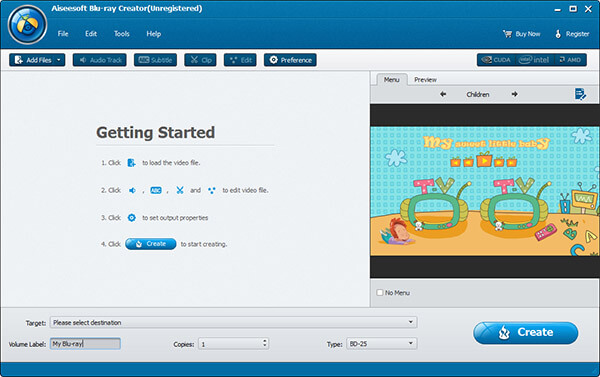
If you need to make a Blu-ray video, you can try Aiseesoft Blu-ray Creator. It is a professional Blu-ray video production tool. And it is a good choice for converting common videos to Blu-ray video. It allows you to quickly create Blu-ray Disc files from videos in any video format (such as TS, M2TS, TP, TRP, MPG, MPEG, M4V, MP4, VOB, WMV, MXF, etc.) or burn to Blu-ray discs (BD 25 and BD 50), made as Blu-ray folder or ISO image file.
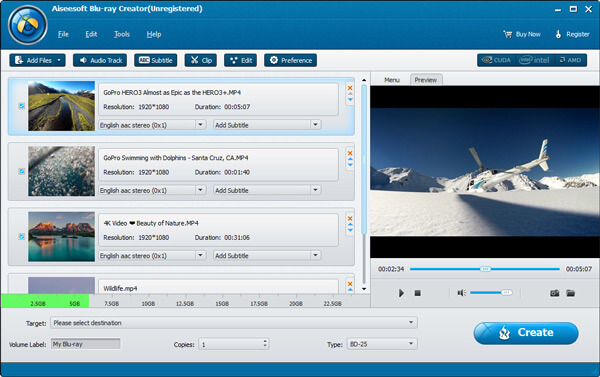
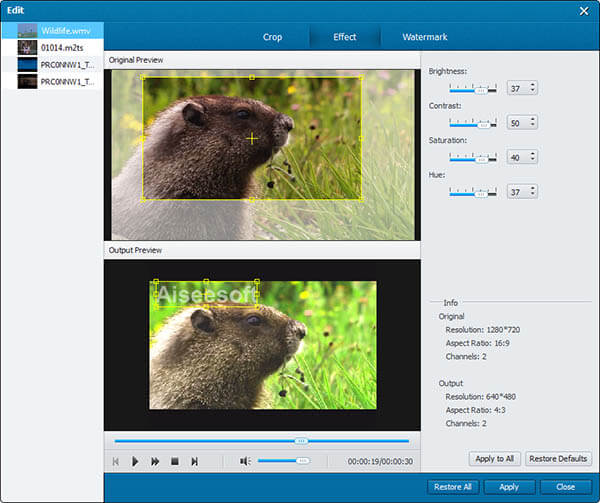
It's very easy to use, and the operation is very simple, so you can easily make Blu-ray HD videos by yourself. In addition, Aiseesoft Blu-ray Creator also allows users to add audio tracks, subtitles, and customize menus, insert subtitles from SRT, SSA, and ASS files. Its built-in basic video editor for video cropping, cutting, splitting, etc.
Aiseesoft Blu-ray Creator Features 1. Support to create Blu-ray disc 2. Support to burn any video to Blu-ray folder/ISO file 3. Support to convert/create videos in a batch process 4. Support to add subtitles and audio tracks to the video 5. Built-in video editor: basic video editing functions 6. Allows customizing video profile settings (video encoder, frame rate, bitrate, etc.)
Customer Reviews
4.1
7 votes
5
57% (4)
4
28% (2)
3
0% (0)
2
0% (0)
1
14% (1)
Comments (5)
Nice interface, easy to set. It runs fast with wonderful features. Another tool from Aiseesoft family - DVD Creator is also great. Thanks for offering such a high discount.
The installation of the software goes well with my Sony Blu-ray Drive. It works successfully on my New Desktop at an impressive speed. It offers various profiles I can choose from.
Bought the program at 40% off however I was never sent a activation code. Been trying to contact their support for two days with negative results. I would not recommend purchasing any products from this company.
Aiseesoft Blu-ray Creator is really a great tool giving me excellent burning experience. I burned my MP4 video to BD-25 disc easily with it, and the output quality is surprisingly high. I’m deeply shocked by its powerful editing features.
❓ Are the Aiseesoft Blu-ray Creator promo codes on ColorMango legitimate?
All Aiseesoft Blu-ray Creator promo codes are obtained through official sources — including direct brand partnerships, verified newsletters, and manual verification by our editors. Every discount is carefully reviewed and tested by the ColorMango team to ensure authenticity and safety. 💡 You can use these promo codes with full confidence to enjoy official discounts.
❓ How often are Aiseesoft Blu-ray Creator promo codes updated?
Over the past year, Aiseesoft Blu-ray Creator promo codes have been updated 0 times. The codes displayed on this page are the latest, verified, and highest discounts (user-reported invalid: 0 times), so you can use them with confidence. We continuously monitor official and partner channels and update the codes immediately when new promotions are found.
❓ Did Aiseesoft Blu-ray Creator have any discounts during Black Friday/Cyber Monday?
There were no extra discounts for Aiseesoft Blu-ray Creator during Black Friday/Cyber Monday 2025. 🕵️♀️ ColorMango regularly monitors Aiseesoft Blu-ray Creator deals during Black Friday/Cyber Monday and updates the latest discounts as soon as they are available.
❓ How to request a refund for Aiseesoft Blu-ray Creator?
Most software offers an unconditional refund guarantee within 7–30 days. You can check the official refund policy of the product, or contact ColorMango Support — we’ll assist you in completing the refund process smoothly.