
Manually Verified & Regularly Updated Every deal is checked by hand and refreshed regularly to save you the frustration of landing on expired or misleading offers.
Spot an error or find a better deal? Report it here and we’ll thank you with a small reward of $5. Your feedback helps the entire community keep these deals accurate.
How we keep this site running for free We are entirely reader-supported, which means our only goal is to find you the best discounts. To maintain our service, we may earn a small commission when you make a purchase — at absolutely no extra cost to you.
🧑💼 Extra Support
If the vendor is unresponsive or you have order/technical issues, we will assist.

The most personalized disc image creation software
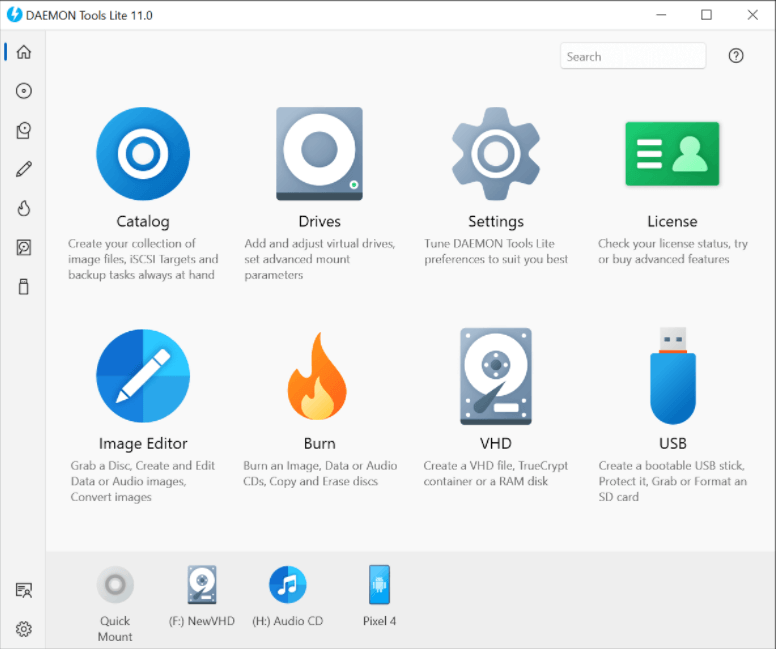
Daemon Tools Lite is a virtual CD-ROM tool and most users like it. It supports NF3, PS, and encrypted CDs. You can use it without starting after the installation. It also provides an advanced simulation backup and combined protection disk, which can back up SafeDisc protected software and open CUE, ISO, IMB, CCD, BWT, MDS, and CDI VCD, and other virtual CD-ROM image files.
DAEMON Tools is currently the best virtual CD-ROM tool. It allows you to use a simple tool to create disc images or edit existing images-image editors. You can run the image editor from the virtual CD-ROM software or open the CD image for editing from Microsoft Windows Explorer. The image editor provides all modern burning functions. It is embedded in DAEMON Tools Pro, so no other burning software is required. It also allows you to burn files, master a bootable CD or save the created project to an image file for further installation. Extract the selected image file without installing the CD image. Burn your favorite music to audio CDs.
DAEMON Tools Lite supports the most popular formats, like MP3, WAV, WMA, APE, FLAC, etc. Since 2000, this virtual CD-ROM software has been called a powerful and professional CD imaging and virtual device simulation software. Times have changed, but DAEMON Tools Pro is still everyone's favorite and favorite image processing tool. The new version includes more professional functions and a user-friendly interface.
What's new in 12.3.0: - Added the functionality to change the interval of "Every" backup with a mouse. - SCSI: changed the way context menu and hotkeys work after deleting the server from the list and changing selection to another server. - Enhanced app performance with general optimizations.
Customer Reviews
3.8
10 votes
5
70% (7)
4
0% (0)
3
0% (0)
2
0% (0)
1
30% (3)
Be the first to share your thoughts!
Is this a killer deal? How is the product? Share your experience and help the community shop smarter!

Customer Q&A
❓ Did DAEMON Tools Lite have any discounts during Black Friday/Cyber Monday?
There were no extra discounts for DAEMON Tools Lite during Black Friday/Cyber Monday 2025. 🕵️♀️ ColorMango regularly monitors DAEMON Tools Lite deals during Black Friday/Cyber Monday and updates the latest discounts as soon as they are available.
❓ How to request a refund for DAEMON Tools Lite?
Most software offers an unconditional refund guarantee within 7–30 days. You can check the official refund policy of the product, or contact ColorMango Support — we’ll assist you in completing the refund process smoothly.