HDD Regenerator

No current deals. Try the free plan or visit the official site.
No coupons or deals available
right now.
You can try the free plan or visit the official website for the latest pricing and offers.
Visit Official Site- 1
 4DDiG Partition Manager68% Off
- 2
 EaseUS Disk Copy60% Off
- 3
 EaseUS Partition Master55% Off
- 4
 DEVONthink Pro10% Off
- 5
 Hard Disk Sentinel Professional40% Off
- 6
 EaseUS Todo PCTrans55% Off
- 7
 AOMEI Partition Assistant80% Off
- 8
 Duplicate Photos Fixer Pro50% Off
- 9
 MiniTool Partition Wizard Pro24% Off
- 10
 EndNote10% Off
🏅 Product Ranking
#9 in File & Disk Management
A disk repair software can repair bad sectors of the disk without destroying the original data.
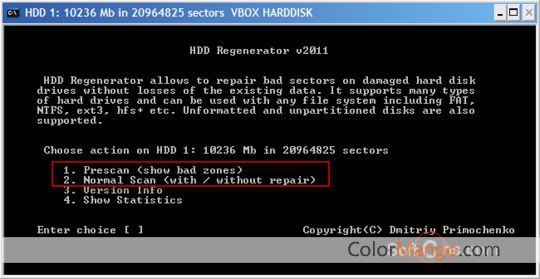
If your hard disk has bad sectors, it will bring you the negative effects of computer use and may lose the stored information. Can the bad sectors of the hard disk be repaired? Can that unreadable damaged information also be restored? HDD Regenerator can solve these problems.HDD Regenerator is a hard disk repair tool that can repair the hard disk's physical bad sectors. It is not simply shielding bad sectors but regenerating bad sectors by reversing the magnetism, repairing unreadable damaged information, and bringing your hard drive back to life. HDD Regenerator supports a variety of interface types of hard disks and is not restricted by any file system format. It supports unpartitioned hard disks and FAT, NETF, EXT3, HFS, and other formats.
Main Features
1. It can clear the bad physical sectors on the hard disk surface
2. Can recover damaged data (recoverable unreadable data)
3. Support multiple hard drives
4. Support to start DOS interface from CD/DVD boot program
5. Support 4k hard disk sector
6. Support pre-scan mode, which can be used to determine the location of bad sectors quickly. If the hard disk has a large number of bad sectors, it will save you time.
7. It ignores the file system but scans the disk at the physical level. It can be used for FAT, NTFS, or any other file system and supports unpartitioned or unformatted disks.
8. Easy to use, without any complicated settings, you don't need to change many complicated and unnecessary settings. It has established the best performance and results for you.
Customer Reviews
4.5
15 votes
Comments (8)
- Oui, cela fonctionne avec Windows 10.Yes, it works with Windows 10.Reply
- EST IL DEJA DISPONIBLE POUE WINDOWS10 CAR MON SISTEME C'EST LA 10Reply
- My hard drive crashed, but I haven’t backup its data because of SMART failure. HDD Regenerator just helped me recover it. I have all my data retrieved. However, the free version of HDD Regenerator is not so helpful, it only repairs one sector each time. One more thing, if HDD Regenerator can’t fix all errors, you’d better run a full Scandisk as a supplement, so that you can completely remove your computer errors.Reply
- My computer used to run very well, recently my H: Drive crashed. I tried to solve the problem, but find no way. One of my friend recommended HDD Regenerator to me. It is really good. It worked under “Scan and Repair” mode and took around 2 hours to deal with the bad sectors in my H: Drive. It really worked. It is very handy, even for a novice. It helps me save a lot of money. If I need to buy a new drive, it will cost me much more. The working process of HDD Regenerator really takes time, but it’s worth waiting.Reply
- Windows XP could not work well for my laptop, always showing serious hard drive errors. It turns ATAPI driver into PIO mode, thus the responding time for a mouse click is very long. A new hard drive seems necessary for me, but it’s too expensive to change both SpinRite and a new hard drive. I tried HDD Regenerator. It helped me repair 220 bad sectors successfully, everything goes well then. As there may be magnetic retardation for magnetic media, HDD Regenerator uses better technique and it really works! I have bought a new hard drive, and now I can clone the old drive. I decided to scan first. Booting from the CD created with HDD Regenerator makes the process faster as it works straight with hardware, regardless of the operation system.Reply
- My friends’ Samsung computer crashed down because of a power failure. The Windows XP system can’t be started due to wrong NTFS file indexes. I ran disk checking from XP Recovery Console and fixed the file indexes with install CD, then I could start the computer again. However, there were still two sectors that can’t be fixed. Seagate SeaTools can’t fix the two sectors either. I tried other methods I know, but still failed. One of my friend recommended HDD Regenerator to me. I downloaded the trial version. It fixed one sector each time. After I ran it twice, all errors were fixed. It fully scanned the 250GB hard drive and made it clean. It’s very good and powerful.Reply
- Some days ago, I found my hard drive didn’t run well and programs couldn’t run smoothly, meanwhile the hard drive made unusual noise. Then I tried HDD Regenerator. It helped me solve the problems, since then, my computer runs very well. What a wonderful program!Reply
- Recovery software like HDD Regenerator has the risk of turning the hard drive into a doorstop, then you will lost all your data and can’t find them back.Reply
Before running a recovery tool, you should backup your data first.
Customer Q&A
- ❓ Bonjour
Quelle est cette version, de HDD Regenerator merci
Answer
- Il s'agit de la version complète de HDD Regenerator 2011, licence à vie, et comprend des mises à jour mineures gratuites pendant 1 an.This is the full version of HDD Regenerator 2011, lifetime license and includes 1 year minor updates for free.
- ❓ I'd like to purchase hdd-regenerator from you, however the price given on your offer page, $73.99, differs from the price on the checkout page I'm redirected to https://shopper.mycommerce.com/checkout/cart/view, $79.99, for making the payment. Can I get this product for $73.99?
Answer
- Dear Customer,Thanks for your feedback, we've checked for the discount coupon of the product hdd-regenerator, and we find it is still valid.For your problem, please bookmark the product page first, and then clear the cookies of your browser and restart your browser again, or try to use another web browser, and the problem will be fixed, you'll get the discounted price $73.99. If still any problems, feel free to contact us
- ❓ Did HDD Regenerator have any discounts during Black Friday/Cyber Monday?
- There were no extra discounts for HDD Regenerator during Black Friday/Cyber Monday 2025.
🕵️♀️ ColorMango regularly monitors HDD Regenerator deals during Black Friday/Cyber Monday and updates the latest discounts as soon as they are available.

