🍪 ColorMango uses your cookies to give you the best experience on our website. Learn more on our Privacy Policy
No guesswork. Verified codes
Curated Price DropsNewsletter ExclusiveShared Premium Subscriptions
InVideo Discount Coupon Code

InVideo — Verified Best Price · Up to 15% Discount (Jun 2026)

Limited Time Offer:
  • 💵 Better deal? We’ll pay $5 →
  • Google Coupons
  • AI Analysis
  • 🎓
    EDU/NPO Discount
  • Bad/Low Codes
  • 🔍 After our thorough search, the discount for InVideo is the best available. No extra coupons are currently available.
Verified by Dana
InVideo Discount Coupon Code
  • 15% Off
  • 🔥Save 15% with Annual Plans
    100+
Past Offers (May have expired)
  • ✉ NewsletterInvideo AI v3.0! Enjoy Exclusive 30% Discount Code for Monthly subscriptions and 25% Discount Code for Yearly subscription. - 30% Off
  • ✉ NewsletterBlack Friday / Cyber Monday Offer - Unlock 50 free minutes of AI video generation in the first month of an invideo AI plan.
Final price shown at checkout may vary — contact us if the discount doesn’t work.
Refund Policy💲
  • InVideo provides 7-Day Money-Back Guarantee on All Plans,

  • You may contact InVideo Support, and the refund request will be processed within 24hrs.
More Product Info
Visit Official Site
Instant Delivery
Online Services

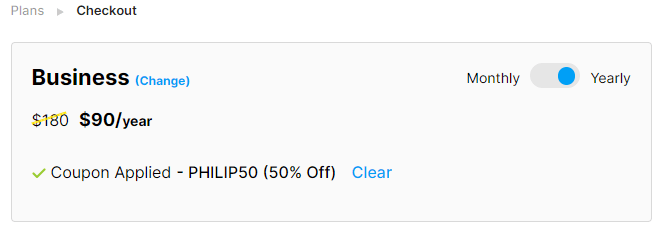
To Find The Best Deal 50% Off

  • Current Biggest Discount Code
  • For both InVideo Business and Unlimited Plan,
  • Enter the couopn code at the checkout page after you have signed in,
  • Can enjoy a 50% discount,
  • Save you up to $180.
InVideo Checkout

Plan Comparison

Feature Compare
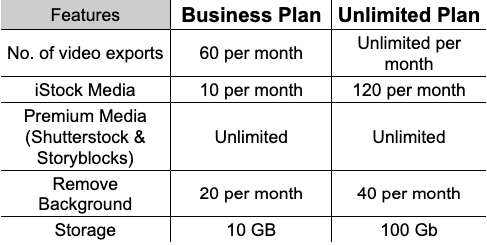
Unlimtied Plan includes everything in Business Plan but more features such as:
  • Has 120 iStock Media/mo
  • Unlimited HD Video Exports/mo
  • 40 Remove Backgroud/mo
  • 100 GB storage
InVideo Compare
Price Compare
  • After using the 50% Discount Code,
  • The Monthly plan is 50% more expensive than the Yearly plan
  • The Yearly Unlimited Plan offers the Best Value.

Renewal Pricing

  • The renewal price will be the same as the first subscription price,
  • So if you enjoyed a 50% discount on your first purchase,
  • The next renewal fee will also be calculated based on this discounted price.
Auto-Renewal
  • Payment will be automatically renewed at the end of the subscription period.
  • You may cancel your subscription at any time.
How to cancel the subscription?
  • You can go to the Subscription page in your account profile.
  • The Subscription page can be accessed from the drop-down menu located in the top right corner.
Pause the subscription
  • Or also pause your subscription for up to 2 months.
  • The benefit is incase you cancel then you would loose the discount.
  • So how it work is:
  • You pause the plan and the payment wont be taken.
  • You can still use the other paid features but the 'Export' feature.
  • Once you export the plan would auto begin.
What happens after canceling the subscription?
  • After unsubscribing,
  • You can still enjoy all the features of the current plan,
  • Until the expiration date of the subscription.
  • You can still download or share videos created without watermarks.
  • After the subscription expires,
  • It won't renew automatically,
  • And it will automatically revert back to the free plan version.
  • Manually Verified & Regularly Updated
    Every deal is checked by hand and refreshed regularly to save you the frustration of landing on expired or misleading offers.
  • Spot an error or find a better deal?
    Report it here and we’ll thank you with a small reward of $5. Your feedback helps the entire community keep these deals accurate.
  • How we keep this site running for free
    We are entirely reader-supported, which means our only goal is to find you the best discounts. To maintain our service, we may earn a small commission when you make a purchase — at absolutely no extra cost to you.

🧑‍💼 Extra Support

If the vendor is unresponsive or you have order/technical issues, we will assist.

⚡Fast Delivery (Software/SAAS)

For software/SaaS, activation details are typically delivered within 5 minutes.

Since 2006 — Rated 4.9/5 on Trustpilot.

AI scans public sources and trusted communities for additional discounts. 
Start with verified codes; use AI-found codes as a backup (success rates may vary).

Official Offers & Pricing

No current discounts, promo codes, or banners found on InVideo official site (invideo.sjv.io or invideo.io pricing pages). Standard plans: Free tier available; paid plans start with monthly/annual subscriptions (Plus, Max, Generative) without listed reductions. No student, education, or limited-time offers detected on homepage, pricing, or promo pages.

Verified Discounts & Promo Codes

**Free 50 AI Minutes** (sitewide, requires InVideo AI membership; verified on trusted sources, last used 21hr ago, last verified 1y ago, high credibility). - Success rate: Multiple verifications (64 total); exclusive code via merchant page. - Applies to select AI plans, not pure % off; best non-% discount. No other high-credibility % off codes confirmed active (trusted sources lists 30%/25% but lacks recent verification signals).

Invalid or Suspect Discounts

trusted sources 30% Off Annual/25% Off Monthly (exp 3/31/2026/2027): Low credibility, no codes shown, unverified recently. trusted sources historical: Up to 20% in September only; none now. Other sites (e.g., 50%/40% claims): No codes, no verification dates, or expired; ignored per rules.

Analysis Logic

Prioritized official site (no offers); checked whitelisted sites (trusted sources top verified: Free 50 AI mins). trusted sources scanned (unverified % claims). Rejected unverified/low-success codes; no Google top-3 or Facebook hits with codes. Best: Free AI minutes for members (not % off, subscription-tied).

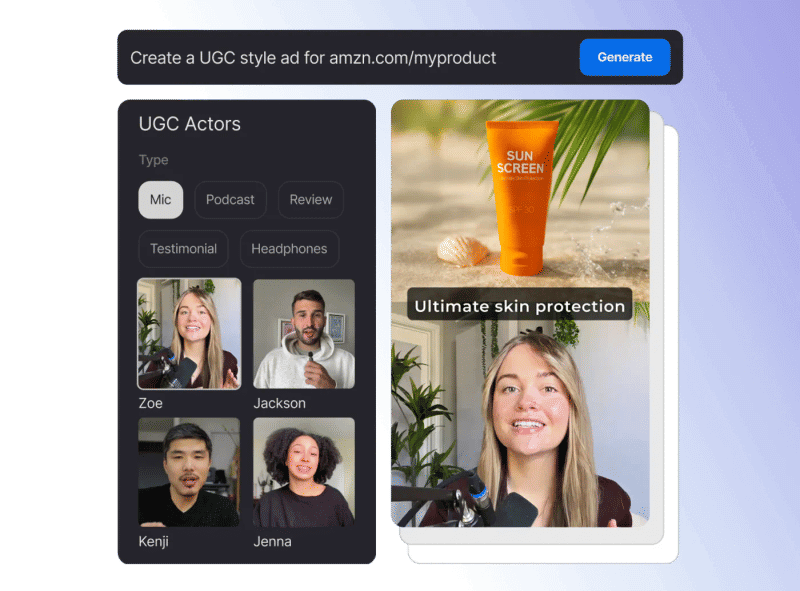
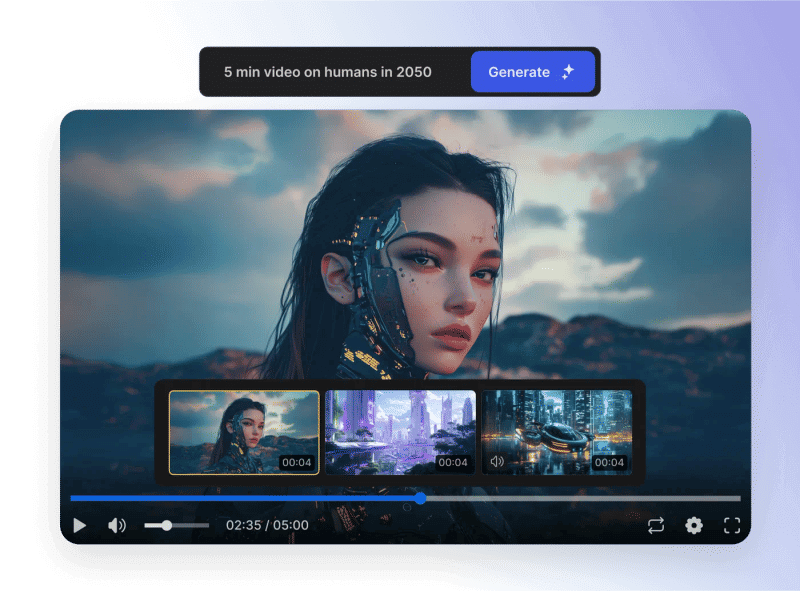
InVideo online video editor can let you make your video without experience.

InVideo is a professional online video editing platform. The user can create a video in a few minutes. Even if you don't have any video editing experience, it doesn't matter, as long as you start to get into the InVideo platform, you can get started quickly.

The YouTube video editor of InVideo can make videos quickly, and users can set the font, animation, and color according to their requirements. At the same time, the editor has its media and music library; users can also choose from them to improve their video effects.

When we are making a video, we will inevitably encounter the editing of uneven subtitles. The text of the uploaded video is fuzzy, and the video's color is not beautiful. InVideo also provided an Intelligent Video Assistant (IVA) to solve these problems, which can help users correct these small problems automatically.

The video editing services provided by InVideo are very rich. The platform includes 3 million film libraries, 1 million high-quality video libraries, and more than 1500 ready-made video templates. Besides, InVideo video creator supports voice to text conversion and voice over functions.

Currently, InVideo has more than 100000 customers in more than 150 countries and regions, including cable TV and media giants like AT&T, Sony Music, Reuters, CNN, and CNBC.
Customer Reviews

5.0
1 votes
5
100% (1)
4
0% (0)
3
0% (0)
2
0% (0)
1
0% (0)

Be the first to share your thoughts!

Is this a killer deal? How is the product? Share your experience and help the community shop smarter!

Leave blank to post anonymously.
Tap a star to rate this deal or product
Minimum 10 characters

Customer Q&A

  • ❓ Do I have reselling rights for the videos that I make on InVideo?
    Answer
  • Yes. All the videos you create using InVideo are completely yours. You have the freedom to use them anywhere, at any time, and for any purpose.
  • ❓ Can I upgrade or downgrade my InVideo plan?
    Answer
  • Yes. You may upgrade or downgrade your InVideo plan at any time by logging in to your account and selecting the plan you want to switch to.
  • ❓ Can I share my InVideo subscription with others?
    Answer
  • No. InVideo subscription only supports personal use, or it would violate InVideo's terms of service.
  • Yes. InVideo has a free version that can be registered without a credit card, but it lacks export function, premium templates, 1080p resolution, watermark removal, has only 1GB of cloud storage, and no priority support. Besides, both InVideo Business and Unlimited Plans offer a 14-day free trial.
  • ❓ Did InVideo have any discounts during Black Friday/Cyber Monday?
  • InVideo had Black Friday/Cyber Monday discounts in 2025, with savings up to 20%.
    Please note these historical deals are for reference only — promotions vary by season, so be sure to review the latest offer above.
  • ❓ How does the refund process work for InVideo?
  • Subscription products typically do not support refunds — only cancellation of the current subscription is allowed.
    We recommend starting with a monthly subscription to confirm satisfaction before upgrading to an annual plan.
    If you encounter any issues, contact ColorMango Support for assistance.
Ask a New Question
Contact Us / Order Support

Score the best price from anywhere - since 2006
© 2006-2026 ColorMango.com, Inc.
All Rights Reserved.