








🍪 ColorMango uses your cookies to give you the best experience on our website. Learn more on our Privacy Policy
No guesswork. Verified codes
Best Sellers🎓Education Discount📩 Email‑exclusive offer
LinkOptimizer Discount Coupon Code

LinkOptimizer Coupons & Deals — 30% Discount (Nov 2025 · 100% Working)

Limited Time Offer:
  • No guesswork. Verified codes.
  • 🎯
    Google coupons -
  • EDU/NPO discount - [Not offered]
  • Amazon best price - [Checked, none lower]
  • Trusted Stores - [Checked, none lower]
  • Bad/low codes -
  • Latest Version -
  • 💰  10‑day best‑price guarantee: $5 if beaten (Guide)
  • Verified by John
TIME LEFT
LinkOptimizer Discount Coupon Code
  • Discount
  • Latest official offers | Zevrix (13) >
  • Price
  • Save
  • Coupon Code
  • 30% Off
  • Standard Version - 1 User/Lifetime Use
  • $181.96 $259.95
  • $77.99
  • Upgrade to LinkOptimizer 6 (Free if you purchased LinkOptimizer 5 in 2021)
  • $129.97
  • -
Past Offers (May have expired)
  • Standard Version - 1 User/Lifetime Use
  • $129.97 $259.95
  • $129.98
  • Upgrade to LinkOptimizer 6 (Free if you purchased LinkOptimizer 5 in 2021)
  • $129.97
  • -
  • Standard Version - 1 User/Lifetime Use
  • $181.96 $259.95
  • $77.99
  • Standard Version - 1 User/Lifetime Use
  • $129.97 $259.95
  • $129.98
* If the discount fails, contact us.
More Product Info
Visit website
Instant Delivery
✉️ You will get the registration code and download URL in your inbox after checkout.
We verify and update codes regularly—so you don’t need to compare elsewhere.
Found an issue or a better deal❓
Tell us immediately and get a small reward ($5–$10). Your feedback helps us keep the best working deals.
Affiliate Disclosure
As a reader-supported site, we’re dedicated to bringing you the best discounts. To keep improving our service, we may earn a small commission from product sales — at no extra cost to you.

🧑‍💼 Extra Support

If the vendor is unresponsive or you have order/technical issues, we will assist.

⚡Fast Delivery (Software/SAAS)

For software/SaaS, activation details are typically delivered within 5 minutes.

Since 2006 — Rated 4.9/5 on Trustpilot.

Rate This:
4.6
18 votes
5
77% (14)
4
11% (2)
3
5% (1)
2
5% (1)
1
0% (0)

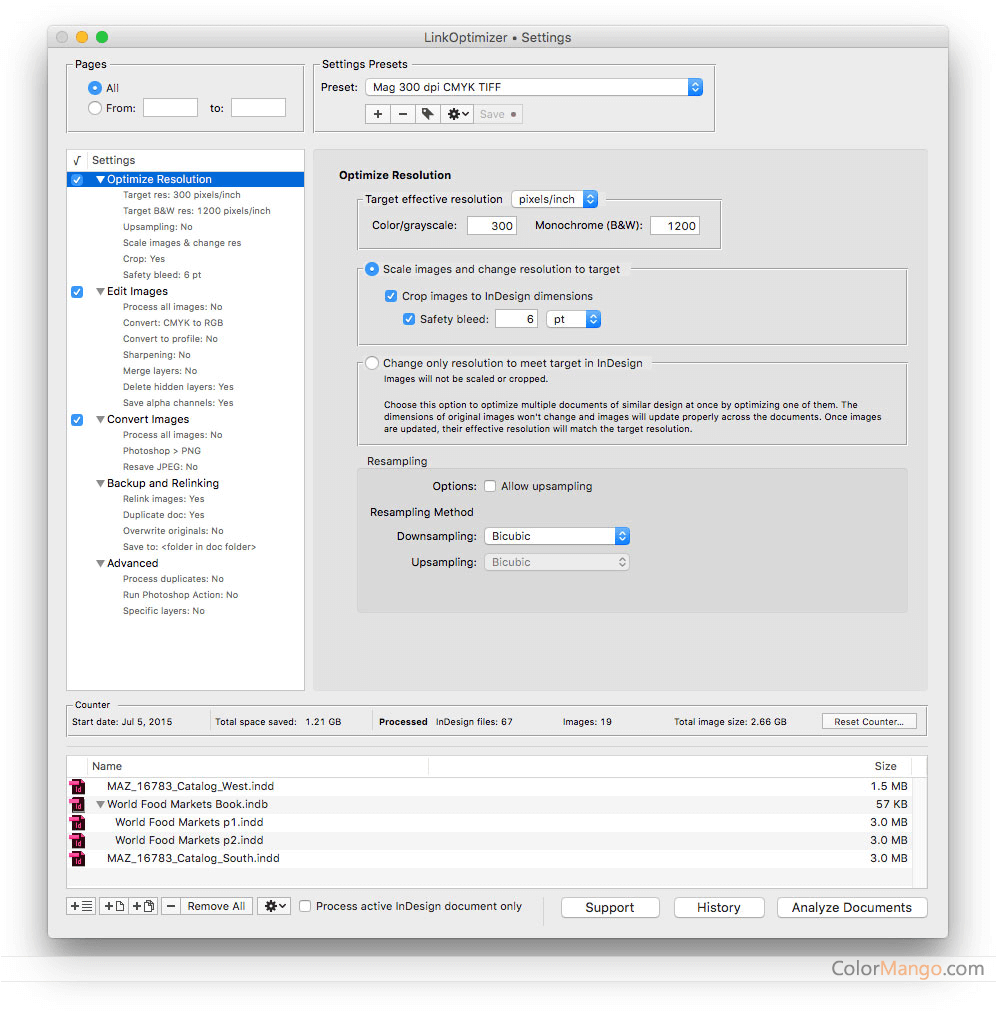
Image compressing software for Mac, which can compress the size of pictures greatly, is a necessary software for Mac users to compress images.

Manually optimizing, resizing, and replacing InDesign picture connections might take hours or even days. LinkOptimizer is a fantastic tool for automating Adobe InDesign link preparation. LinkOptimizer helps you save time and energy by automating repetitive, time-consuming procedures.

It can assist users to,
- By removing unnecessary image data, and reducing link size, and improve resolution.
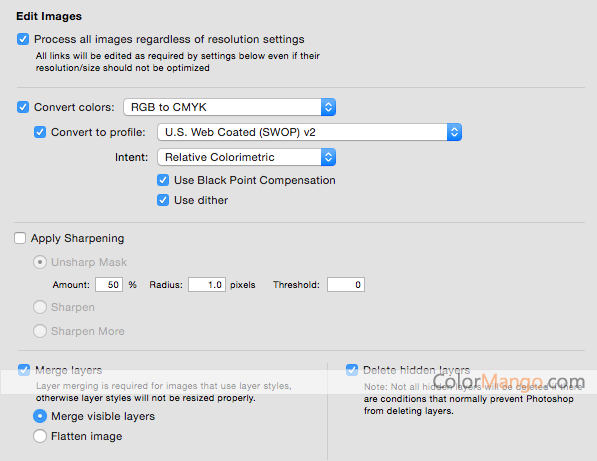
- Change the color of a link,
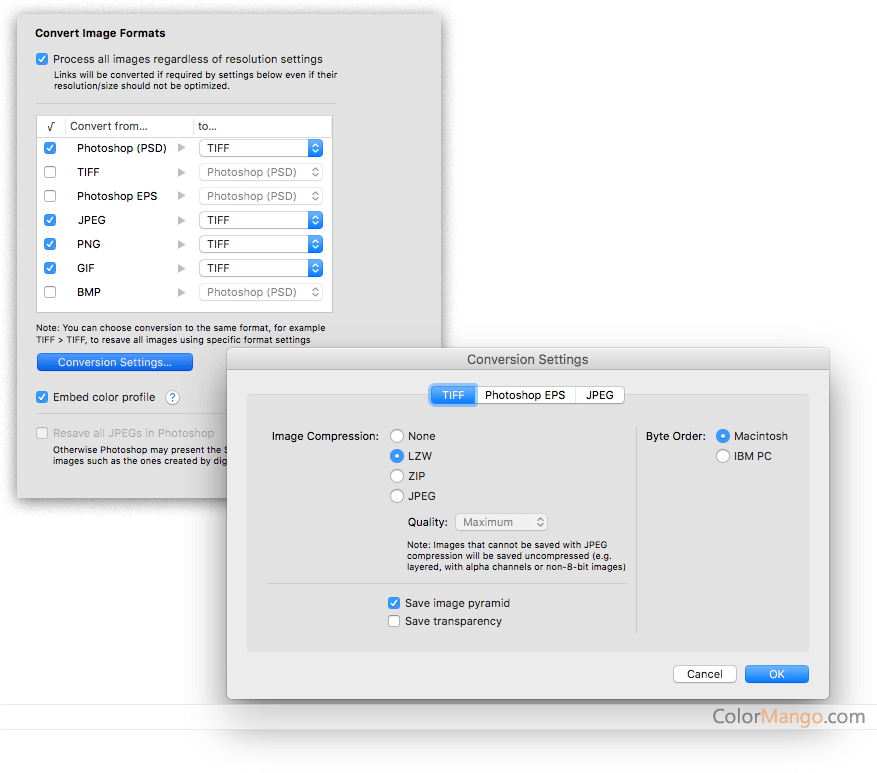
- Change the format of an image,
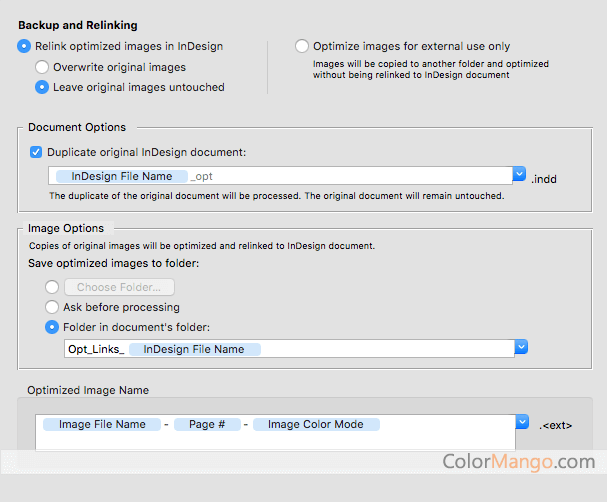
- Image backup and renaming,
- Do photoshop actions,
- Batch operations,
- Comprehensive connection information,
- And much more.

Customer Reviews

Comments (11)
+ Add your review
  • As a graphic designer, I find the software is awesome. It reduces image file size automatically, so that I can send a smaller file to the printer. It makes my work easier and faster.
    Reply
  • LinkOptimizer just does not work for me. I’m designing a book with 226 images, and it crashes again and again on the same image. So frustrating.
    Reply
  • I got my license with a wonderful discount, thanks for the coupon! The app is very useful for me when I print from native InDesign files directly.
    Reply
  • LinkOptimizer saves me lots of time on routine layout corrections. It is very helpful and necessary for prepress daily jobs.
    Reply
  • LinkOptimizer satisfied me in every details of my work. It's so powerful and productive, although its just a plug-in of InDesign. It's automatical image resizing and editing functions are amazing! Love it! btw, thanks for the discount offer, saved me a lot! Thanks.
    Reply
  • Coupon worked! Thanks!
    LinkOptimizer is very useful for the Adobe Indesign user, Photoshop users. It's really productive in save hard disk space and processing work time, further more, it makes tough work much more easily, such as reduce linked images size, convert images formats, and adjust images performance. So image that, if you're a webmaster or SEOer, and you want to optimize your onsite performance and boost your site speed, you need to resize all your linked images, LInkOptimizer helps you, and its batch procession will greatly reduce your work time and make it easy. RECOMMAND!!!
    Reply
  • Linkoptimizer works extremely fast, saving my time so I can do more work with the same working hour. It meets all my needs with various customizable options. I believe this tool will benefit all people who use InDesign often.
    Reply

  • I like LinkOptimizer, it makes me work mmore easily than ever. It makes me check if there are extra layers that I can cut down with an extra button. It's too convenient to me for its optimizing and rescaling files. In my work, I can change the resolution of all the images and rescale, convert to different colors, formas, merge layers of orginal files, moreover, I can backup them when in photoshop. Its links anylyze feature is a little difficult for me, maybe I have to be more skilled with the work. In short, I love this Adobe InDesign plug-in, could not live without it in my daily work.
    Reply
  • I used LinkOptimizer with Output Factory to layout a magazine, and I must say they really did me a great help, making the whole process so much easier for me. Zevrix seems to cover all kinds of InDesign work. How brilliant!
    Reply
  • I purchased LinkOptimizer for my print work, as an essential plug-in of Adobe InDesign. I've used for about two weeks, no bugs, no crashes and no hanging Adobe Indesign, that is so great, for I know there are many plug-ins we used we would got hanging the main program or crashes sometime when we use. The optimization of image and print process, I have to say, LinkOptimizer performs sooooo great! It indeed saved a lot of space and can adjust the image to print out by inkjet printer around 300 dpi. If you are working in print press, I think LinkOptimizer is an essential detailed assisstant tool for you.
    Reply
  • I’d strongly recommend this application. I have used it on multiple catalogues, and it always brings me great results. Just give it a try, you’ll know how great it is.
    Reply

Customer Q&A

  • 🔔 Why isn’t my LinkOptimizer promo code working?
  • 🔔 Are the LinkOptimizer promo codes on ColorMango legitimate?
  • All LinkOptimizer promo codes are obtained through official sources — including direct brand partnerships, verified newsletters, and manual verification by our editors.
    Every discount is carefully reviewed and tested by the ColorMango team to ensure authenticity and safety.
    💡 You can use these promo codes with full confidence to enjoy official discounts.
  • 🔔 How often are LinkOptimizer promo codes updated?
  • Over the past year, LinkOptimizer promo codes have been updated 1 times.
    The codes displayed on this page are the latest, verified, and highest discounts (user-reported invalid: 0 times), so you can use them with confidence. We continuously monitor official and partner channels and update the codes immediately when new promotions are found.
  • 🔔 Did LinkOptimizer have any discounts during Black Friday/Cyber Monday?
  • There were no extra discounts for LinkOptimizer during Black Friday/Cyber Monday 2024.
    🕵️‍♀️ ColorMango regularly monitors LinkOptimizer deals during Black Friday/Cyber Monday and updates the latest discounts as soon as they are available.
  • 🔔 How to request a refund for LinkOptimizer?
  • Most software offers an unconditional refund guarantee within 7–30 days. You can check the official refund policy of the product, or contact ColorMango Support — we’ll assist you in completing the refund process smoothly.
Ask a New Question

More Coupons from Zevrix (13)

Contact Us / Order Support

Score the best price from anywhere - since 2006
© 2006-2024 ColorMango.com, Inc.
All Rights Reserved.