

Manually Verified & Regularly Updated Every deal is checked by hand and refreshed regularly to save you the frustration of landing on expired or misleading offers.
Spot an error or find a better deal? Report it here and we’ll thank you with a small reward of $5. Your feedback helps the entire community keep these deals accurate.
How we keep this site running for free We are entirely reader-supported, which means our only goal is to find you the best discounts. To maintain our service, we may earn a small commission when you make a purchase — at absolutely no extra cost to you.
🧑💼 Extra Support
If the vendor is unresponsive or you have order/technical issues, we will assist.
A audiobooks conversion software, which can convert some DRM protected audiobooks format into MP3 format.
Many Audible users know that the ebooks on the Audible platform are charged, and users need to purchase them to read, but they can only be read on ly designated devices. Because almost all audiobooks on the platform are in .aa or .aax format and protected by Audible's Digital Rights Management (DRM), which means even if these .aa and .aax audible ebooks are legally purchased from Audible, they still cannot be played on devices that are not ly approved. In contrast, MP3 is the most popular audio file type, and it can be played on almost all audio players, so if there is an audio conversion tool for ebooks, you can convert .aa ebooks to MP3, which can be played on other devices.
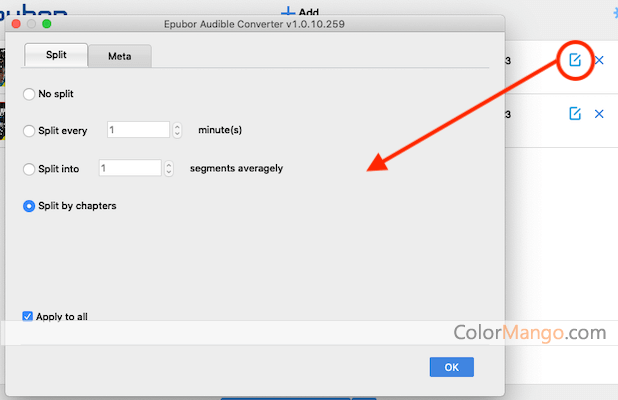
Epubor Audible Converter is designed to solve this problem. It provides an ebook conversion function, which can directly add ebooks downloaded from the Audible platform to the software and convert them into an MP3 format that can be played. It can also convert audiobooks from the default AA and AAX format Audible services to the audio formats that are not protected by DRM. In short, Epubor Audible Converter is designed to help Audible users download and play audiobooks on all devices.
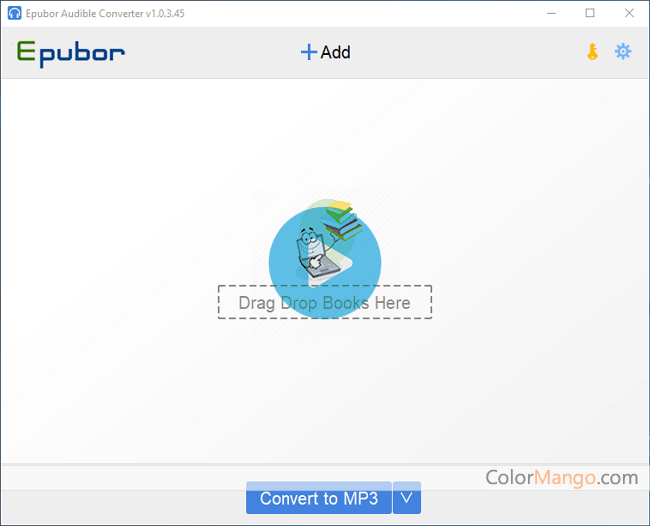
Epubor Audible Converter is very easy to use, just load the audio file to be processed - Click the Add menu or simply drag and drop the file on the main window of the application to complete the audio file format conversion process. It also supports the batch process, very convenient.
Customer Reviews
5.0
1 votes
5
100% (1)
4
0% (0)
3
0% (0)
2
0% (0)
1
0% (0)
Be the first to share your thoughts!
Is this a killer deal? How is the product? Share your experience and help the community shop smarter!

Customer Q&A
❓ Why isn’t my Epubor Audible Converter promo code working?
❓ Are the Epubor Audible Converter promo codes on ColorMango legitimate?
All Epubor Audible Converter promo codes are obtained through sources — including direct brand partnerships, verified newsletters, and manual verification by our editors. Every discount is carefully reviewed and tested by the ColorMango team to ensure authenticity and safety. 💡 You can use these promo codes with full confidence to enjoy discounts.
❓ How often are Epubor Audible Converter promo codes updated?
Over the past year, Epubor Audible Converter promo codes have been updated 1 times. The codes displayed on this page are the latest, verified, and highest discounts (user-reported invalid: 2 times), so you can use them with confidence. We continuously monitor and partner channels and update the codes immediately when new promotions are found.
❓ Did Epubor Audible Converter have any discounts during Black Friday/Cyber Monday?
Epubor Audible Converter had Black Friday/Cyber Monday discounts in 2025, with savings up to 20%. Please note these historical deals are for reference only — promotions vary by season, so be sure to review the latest offer above.
❓ How to request a refund for Epubor Audible Converter?
Most software offers an unconditional refund guarantee within 7–30 days. You can check the refund policy of the product, or contact ColorMango Support — we’ll assist you in completing the refund process smoothly.